Vibe
Vibe is Vendasta's AI-powered application builder in Business App. Describe what you want in plain English, and Vibe generates a working web application with components, routing, styling, and a live preview.
For a deeper dive into Vibe, visit the Vibe documentation in Business App Help Center.
What is Vibe?
Vibe turns natural language prompts into real, deployable web applications. Instead of hiring a developer or writing code from scratch, your team describes what they want to build and Vibe's multi-agent AI system handles the rest:
- Planning: Understands the request and creates an implementation plan
- Generation: Writes components, pages, and styling
- Building: Runs a language server alongside the build to catch and fix errors, missing imports, and broken references within the same generation pass
- Preview: Shows the result in a live preview as changes are made
The entire process streams in real-time, so you can watch the application take shape as the AI works.
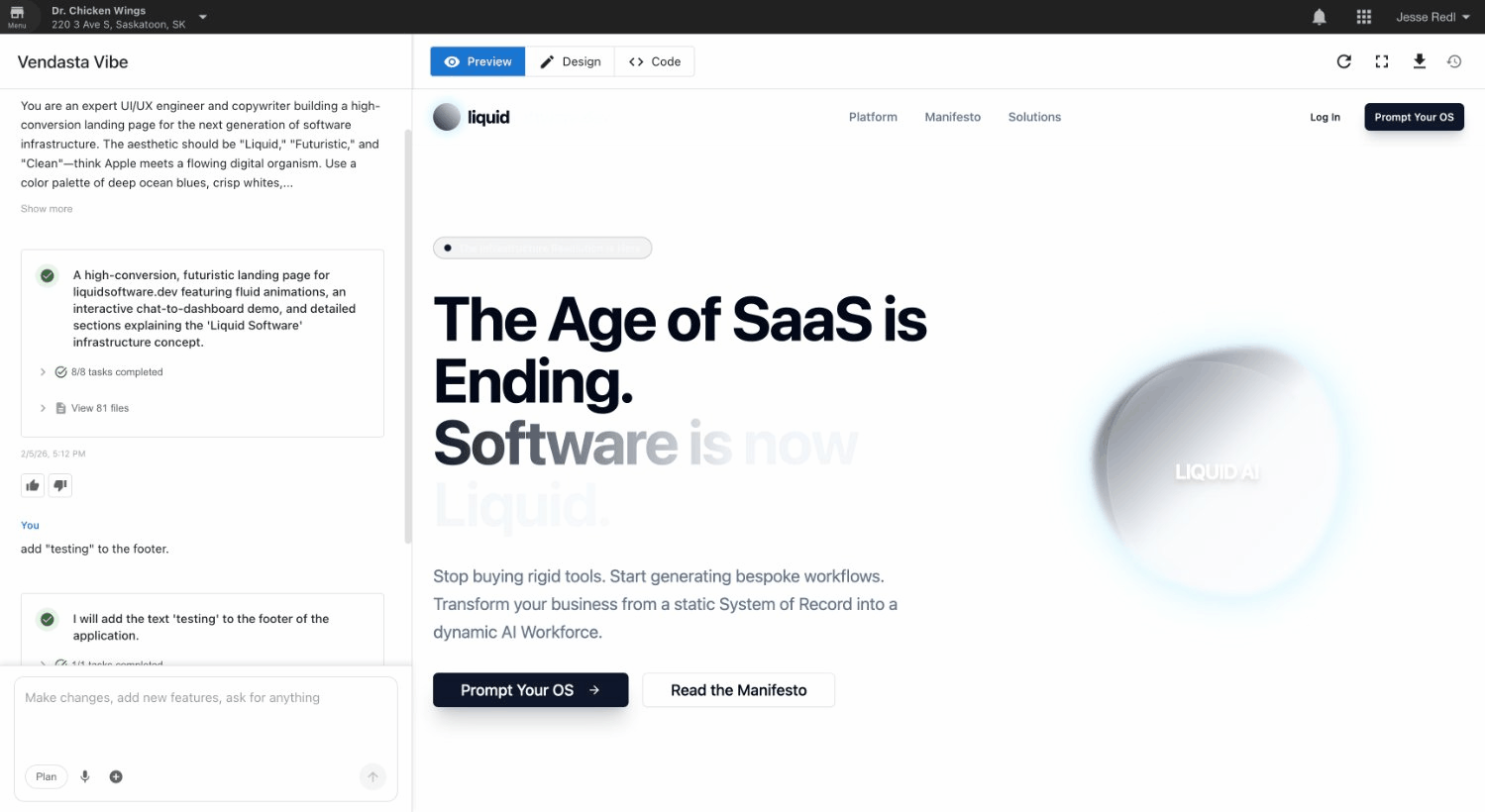
Key features
Chat-based development
Describe what you want in the chat panel. Vibe interprets the request and generates or modifies the application. Send follow-up messages to refine the result. Vibe's chat supports multiple languages, including French, Spanish, German, Italian, Czech, Chinese, Japanese, and Korean.
Real-time code intelligence
Vibe runs a language server alongside the application as it builds. Errors, missing imports, and broken references are caught and fixed within the same generation pass. The AI traces dependencies across the project, so edits to shared components account for everything that depends on them.
Visual editor and themes
Switch to Design mode to browse pre-built color themes, toggle between light and dark mode, and make visual edits to elements directly, no code required.
Plan mode
For complex changes, enable Plan mode to have Vibe show its implementation plan before it starts building. You can review, edit, and approve the plan before any code is written.
Clarifying questions
When a request is ambiguous, Vibe asks clarifying questions before proceeding. This ensures the generated output matches the intent rather than making assumptions.
Multi-modal input
Attach images to prompts to show Vibe what you want. Use the microphone button to dictate changes using voice: Vibe transcribes speech into a prompt.
URL cloning
Paste any public URL into Vibe and it will scaffold a new application inspired by that site's layout and structure. This gives you a head start when you want to recreate or remix an existing design without starting from a blank canvas.
Integrations
Vibe connects to Vendasta platform services including Forms, analytics, authentication, and CRM. You can build applications that embed contact forms, surface live contacts and pipeline data, gate content behind sign-in, and more, all platform-native, already connected to your instance with no manual embed or configuration step.
AI image generation
Generate custom images directly within the application using Gemini. Describe the image you want, and Vibe creates and embeds it in the project.
Code editor
Switch to Code mode to view and edit the generated source code directly. Browse the file tree, open files in tabs, and make manual edits that sync with the preview. Code mode supports GitHub sync for version control and collaboration. The code editor is a Pro plan feature.
Checkpoints
Vibe automatically creates checkpoints as you iterate. You can view diffs between versions and restore previous states if needed.
How does Vibe build an application?
When you send a prompt, Vibe's orchestrator coordinates multiple AI agents:
- Describe what you want in the chat panel
- Analysis: The AI understands the intent and may ask clarifying questions
- Planning: For complex changes, a planning agent analyzes the project and creates a step-by-step plan
- Generation: A generation agent writes the code, creating and editing files
- Building: Vibe builds the application, catches and fixes errors using a language server, and shows a live preview
- Iteration: Review the result and send follow-up prompts to refine it
All of this happens through a streaming interface: you see status updates, file changes, and the live preview updating in real-time.
What is a Vibe app built on?
Every application Vibe generates is built on a modern, production-ready stack:
- React 19 with TypeScript
- TanStack Start for routing and server rendering
- Vite for fast builds
- Tailwind CSS for styling
- shadcn/ui component library
- Lucide icons
Every one of these is open source. On the Pro plan, the complete source of a project can be downloaded and hosted anywhere that runs Node.js — see Download & Host Your Project Elsewhere.
Frequently asked questions
How do I delete a project in Vibe?
Open the project, go to the Settings tab, and scroll to the bottom of the page. Select Delete Project. Deleting a project frees a slot if you have hit your plan's app limit.
Is a Vibe app a WordPress site?
No. Vibe apps are built on React, TanStack Start, Vite, and Tailwind CSS. On the Pro plan, you can download the complete source code and host it anywhere that runs Node.js.
Can Vibe create images for my app?
Yes. Describe the image you want and Vibe generates it with Gemini and embeds it in the project.
Can I add a contact form to a Vibe app?
Yes. Vibe connects to Forms, analytics, sign-in, and CRM, so you can embed contact forms and send submissions to the CRM without a manual embed or configuration step.
Can I edit a Vibe app's code directly?
Yes, on the Pro plan. Switch to Code mode to browse the file tree and edit files. Code mode supports GitHub sync for version control.