How do I get started with Vendasta Services?
The Get started learning path sequences your first-week setup: the platform, branding, accounts, your team, and getting paid.
Vendasta Services is a fulfillment team you order from Partner Center to deliver websites, digital ads, social posting, listings, reputation, and AI employee services for your clients. You review the service, order it, attend the pre-launch call, and track progress in Fulfillment. Each service follows industry best practices and set processes. Use the checklist below to get started.
Getting Started Checklist
- Set yourself up for success
- Learn best practices: videos by service
- Order the product(s)
- Attend the pre-launch call (if applicable)
- Track the progress of fulfillment
How do I prepare to sell Vendasta Services?
Building a new website, taking over your customers' social posting, and setting up a successful digital ads campaign comes with a lot of moving parts.
These steps are laid out to help equip you with plenty of resources and information to get more out of your fulfilled services.
How do I find product details and assets in the Marketplace?
- Go to
Partner Center→Marketplace→ Discover Products - Click More filters
- Check the box for Vendasta Services
- Click into any service you want to learn more about
- Read through product information, find FAQs, and check out add-ons
- Click Screenshots & Files to find marketing images, sales decks, and expectation brochures
- Click the Start Selling button in the top right corner to add to your store
Where do I find the service expectations?
Expectation brochures are unbranded documents provided by Vendasta Services that break down the timelines, details, and deliverables that you and your customers can expect after ordering. You can also check out this article to get a high-level overview and reference for expectations across all product lines.
You can find expectation brochures inside of the platform:
- Go to
Partner Center→Marketplace→ Discover Products - Go to the product page for the Vendasta Services product for which you want more expectation information
- Click Screenshots & Files
- Look for a file with Expectation in the title
Or you can access them on the Vendasta Services unbranded website and click Expectation Brochures.
Where do I review the fulfillment forms?
An important step in ensuring a quick turnaround for your fulfillment is providing a completed fulfillment form. The information in these forms helps the Vendasta Services teams complete the ordered services in alignment with what you and your customer want.
Fulfillment form information is also available in Partner Center → Marketplace → Discover Products by visiting any of the product pages. On the right, you will find a section for Required Forms and clicking into it will show you the form.
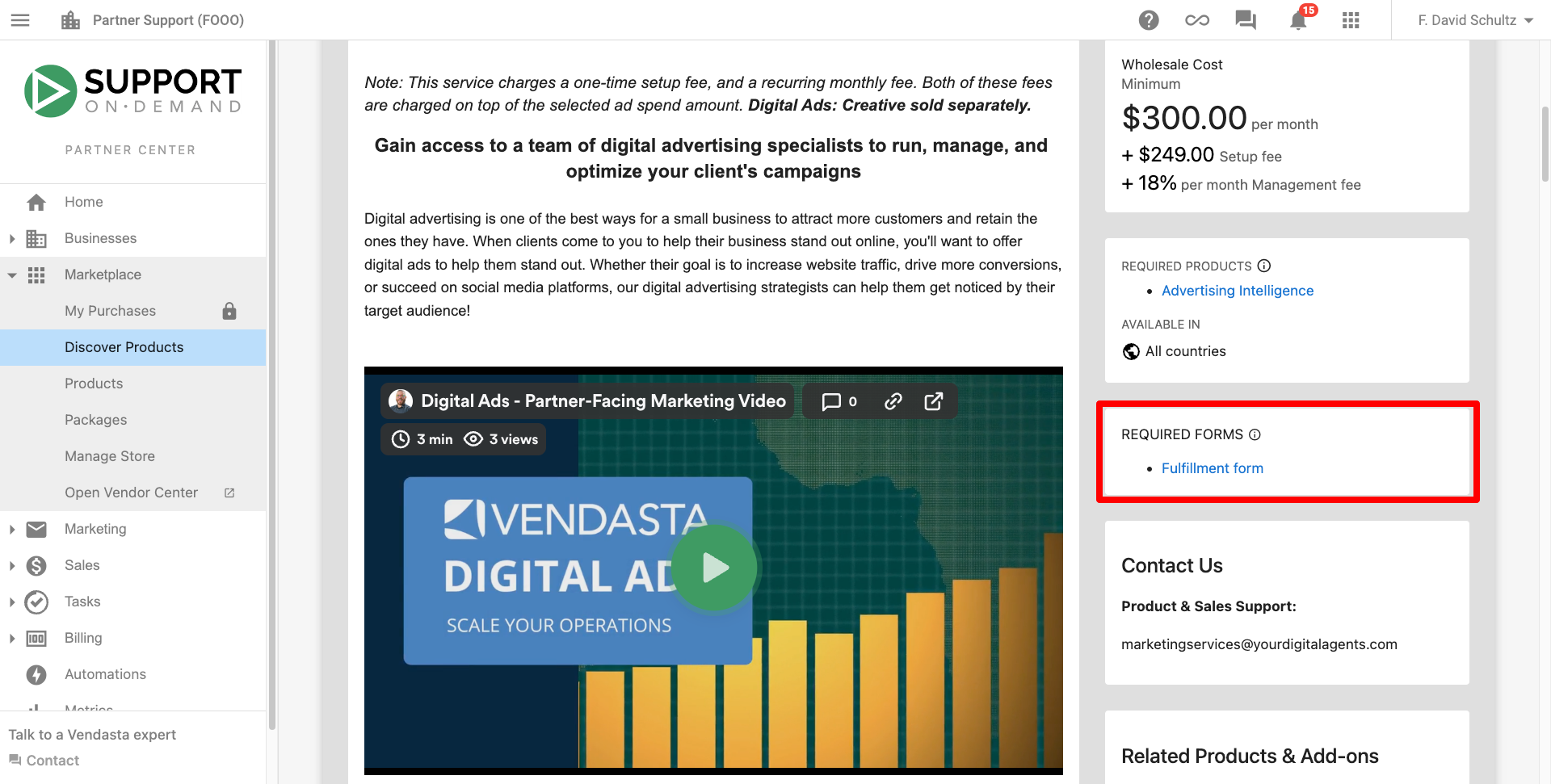
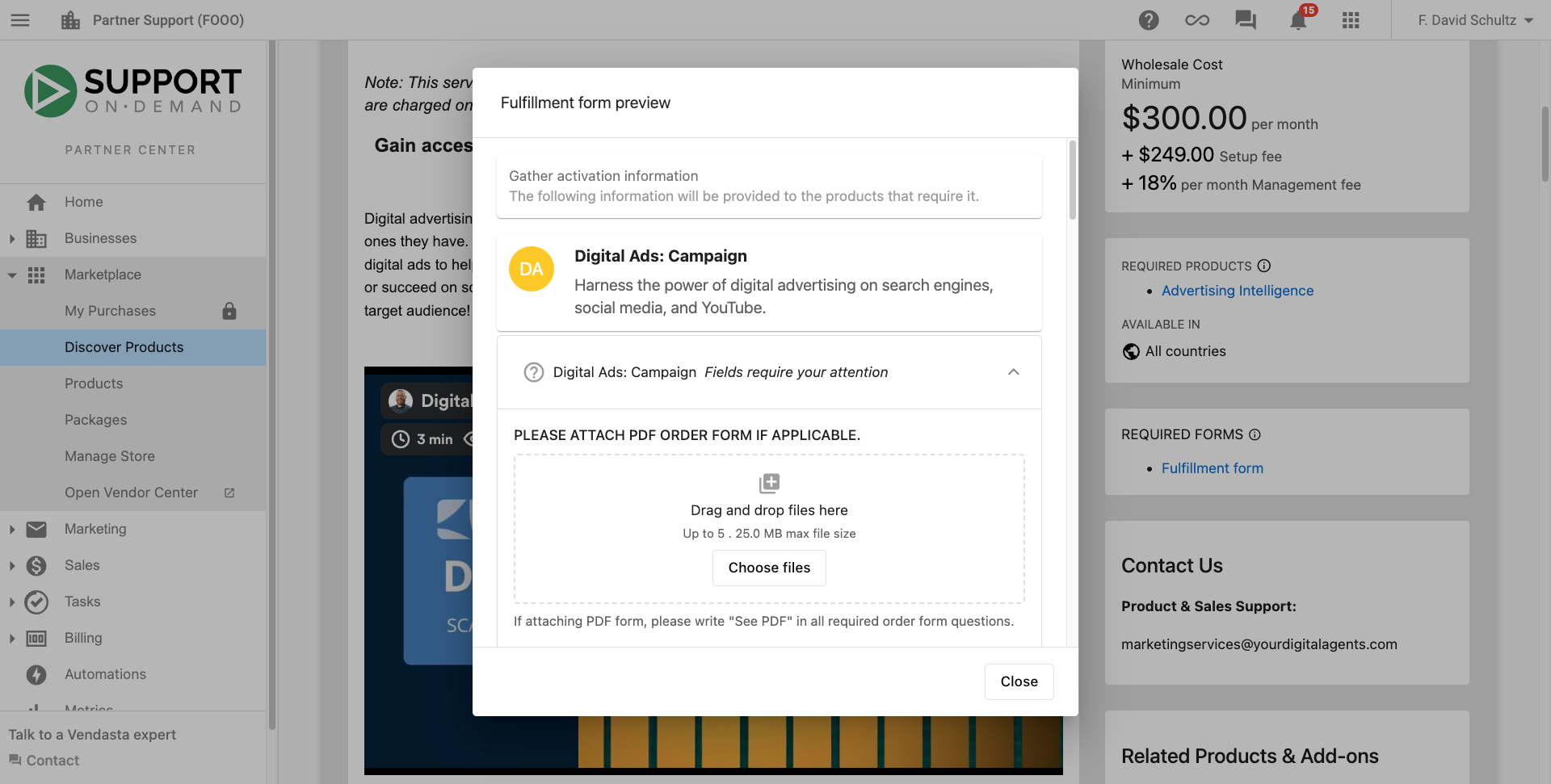
Accessing the fulfillment form preview in Partner Center is one of the best ways to check for the information. You can find downloadable pdfs with some of the important form details here.
How do I order Vendasta Services?
What are the general ordering steps?
Ordering Vendasta Services products is the same as ordering any product in the platform. It's important to know that our teams require additional information after the product has been ordered so they can successfully fulfill the service in line with what you and your customers require.
- Go to
Partner Center→Businesses→Accounts→ Click on the account for which you want to place an order - Click Order Products
- Select the package(s) or product(s) you wish to order
- You may be prompted to activate additional products that are needed to fulfill services (eg. Social AI is needed for our team to post as part of our social posting services)
- Click Proceed to Next Step
- Review and fill in any contact information
- Click Next
- Review and Purchase
After completing the purchase, you will be presented with a fulfillment form. This form contains necessary details to be completed so that Vendasta Services teams can successfully complete the work that has been purchased. Learn more about fulfillment forms.
Check out this video for full details on inputting information, sharing, and submitting a fulfillment form.
How do I order website services?
Website services in particular require a lot of information about a business in order to successfully create their website and web copy with expedient turnaround times. Check out our website ordering guide and the video below for more info.
The following video showcases an older workflow from before the implementation of fulfillment forms. The workflow is very similar, with the exception that the ability to upload a content form pdf comes after the purchase.
How do I order digital ads?
When ordering Digital Ads, you will be required to choose the ad spend for the campaign. This is the amount specific to the ad spend and then the system will calculate the ad management fee for you. You will be prompted to do this between steps 4 and 5 in the workflow noted above.
Note that the ad spend, management fee, and setup fees are all a part of the wholesale cost.
Check out this video to learn more:
What happens on the pre-launch call (if applicable)?
Almost all services include a pre-launch call, often called an onboarding call, to welcome the customer, go through a content questionnaire, and set expectations for the services. Check out this article to see which services receive a pre-launch call.
Our team will choose a time for this call and send an invite to any contacts listed at the time of order (these contacts will also be given a link to reschedule if necessary as part of the invite). The call will happen over a Google Meet; the agent from Vendasta Services typically does this with camera off to preserve white label, and will use the call to align the customer expectations and needs from the service with fulfillment processes.
This call is also important to ensure that we have all of the necessary access and connections that we need. Learn more about connecting accounts in Business App. You can also learn more about how Facebook connections for Digital Ads work.
How do I track the progress of fulfillment?
You, your sales team, and your customers can keep an eye on the progress of fulfillment for the services you have ordered.
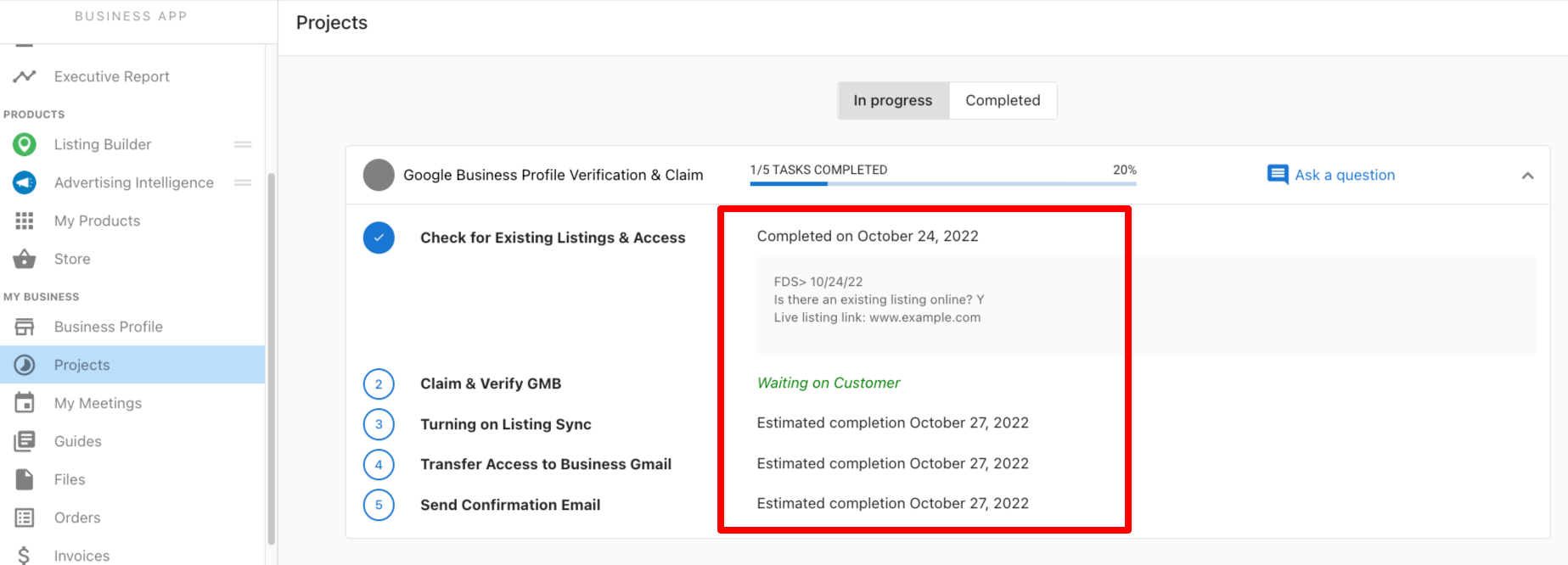
You watch the work from Partner Center → Fulfillment → Projects. Your customers watch the same work from their own Business App under Projects.
There is also a Projects card found in the account under Partner Center → Accounts → Manage Accounts.
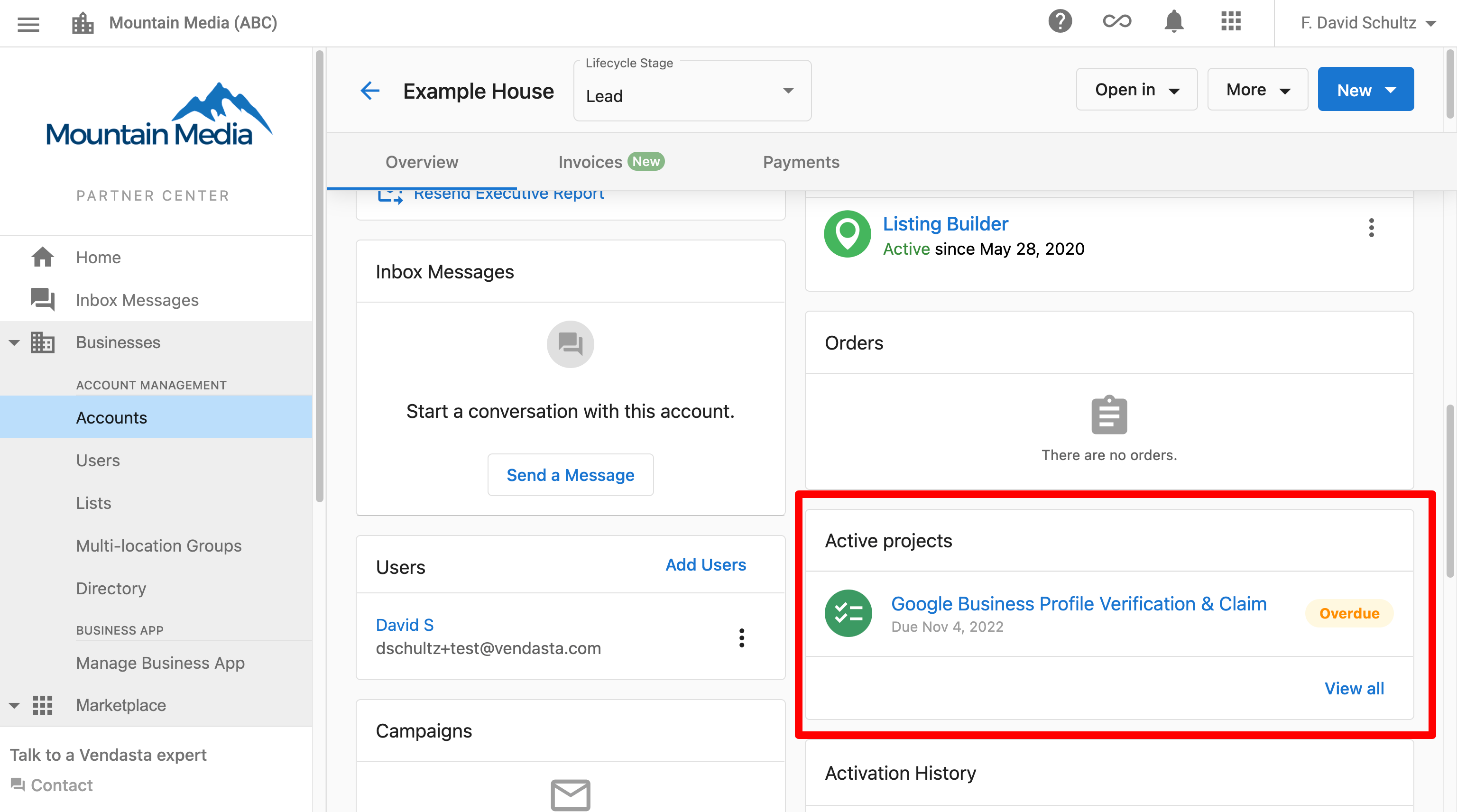
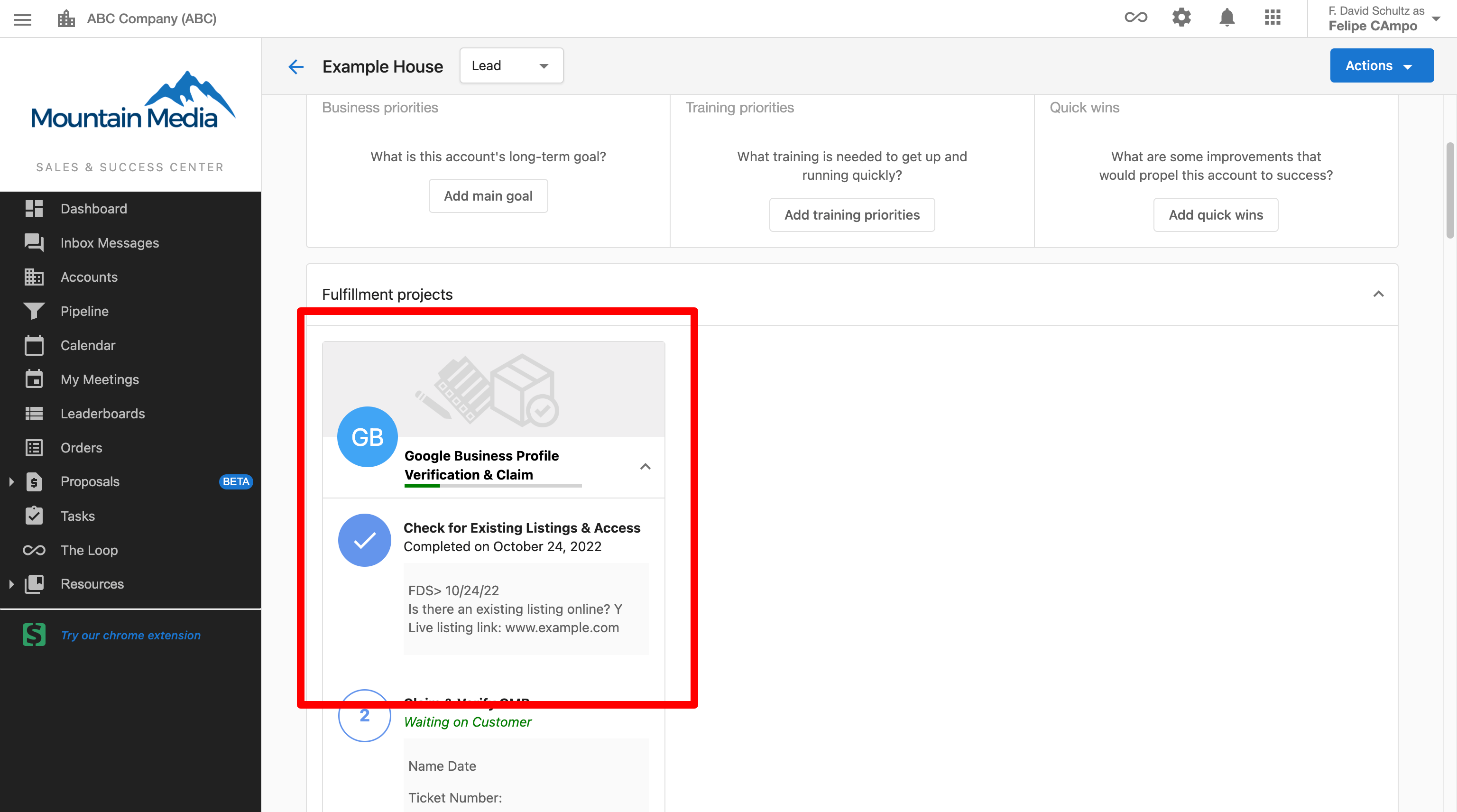
Your salespeople can view this information on the account page under Fulfillment projects.
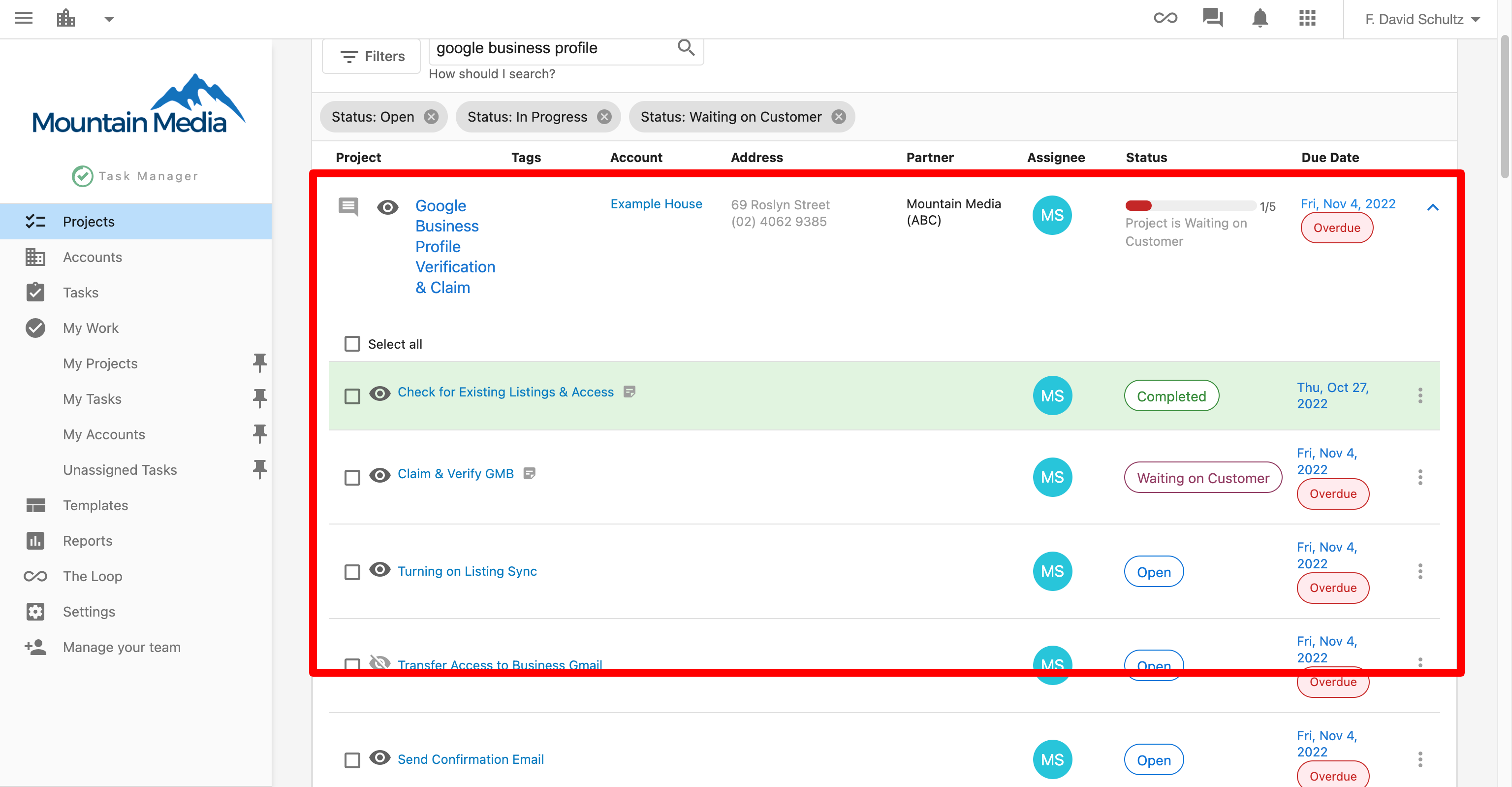
You can also find information by going into Task Manager/Fulfillment → Projects. Some of this information may be "grayed out" or inaccessible because the project is being completed in Vendasta Services' Task Manager/Fulfillment account and a read-only version is shared with you.
Frequently asked questions
Which Vendasta Services include an onboarding call?
Almost all services include a pre-launch call, often called an onboarding call, to welcome the customer, go through a content questionnaire, and set expectations. See Expectations by service for which services include one.
When do I complete the fulfillment form?
After you complete the purchase, you're presented with a fulfillment form. The Vendasta Services teams need this information to complete the work you ordered, so fill it out completely for a quick turnaround.
Where can I find marketing images and sales decks for Vendasta Services?
Go to Partner Center → Marketplace → Discover Products, filter by Vendasta Services, open a service, and click Screenshots & Files. You'll find marketing images, sales decks, and expectation brochures there.
Is the Digital Ads ad spend part of the wholesale cost?
Yes. When you order Digital Ads, you choose the ad spend and the system calculates the ad management fee. The ad spend, management fee, and setup fees are all part of the wholesale cost.
Can my clients see the progress of their services?
Yes. Your customers can watch the same work from their own Business App under Projects, while you track it from Partner Center → Fulfillment → Projects.