How do I collect ACH payments from clients?
Overview
Vendasta Payments lets US-based partners bill US clients by ACH direct debit through Stripe. You select ACH direct debit transfer as a payment option on invoices, subscription billing, or orders, and your client pays from a US bank account.
ACH payments use the Automated Clearing House (ACH) network.
Prerequisites for ACH payments
Before leveraging ACH payments with Vendasta, ensure the following:
- Vendasta Payments are set up.
- You are based in the US and serve clients located in the US.
What authorization do I need before debiting a client's bank account?
Compliance with regulations, including those set forth by the National Automated Clearing House Association (NACHA) and federal legislation, mandates that an Authorization Agreement be established with clients before charging their bank accounts. Vendasta Payments, in partnership with Stripe, facilitates this process by presenting clients with an authorization agreement upon initiating ACH payments. This agreement grants permission for future automatic charges, but it's advisable to obtain explicit consent from clients before debiting their accounts.
Sample Agreement:
ACH Agreement:
Thank you for signing up for direct debits from <Partner>. You have authorized <Partner>, and, if applicable, its affiliated entities to debit the bank account specified above for any amount owed for charges arising from your use of <Partner's> services and/or purchase of products from <Partner>, pursuant to <Partner's> website and terms, until this authorization is revoked.
You have authorized <Partner>, and, if applicable, its affiliated entities to debit your bank account periodically if and when you use <Partner's> services or purchase more than one of <Partner's> products periodically pursuant to <Partner's> terms. Payments that fall outside of the periodic debits authorized above will only be debited after your authorization is obtained.
You may amend or cancel this authorization at any time by providing notice to <Partner> with 30 (thirty) days' notice.
View these terms on Stripe.com
What fees apply to ACH payments?
Transactions processed via ACH entail the following fees:
- 1% of the invoice amount.
- $1 Instant verification fee.
- $4.00 per failed ACH direct debit payment.
- $15.00 per disputed ACH direct debit payment.
How do I request an ACH payment on an invoice?
-
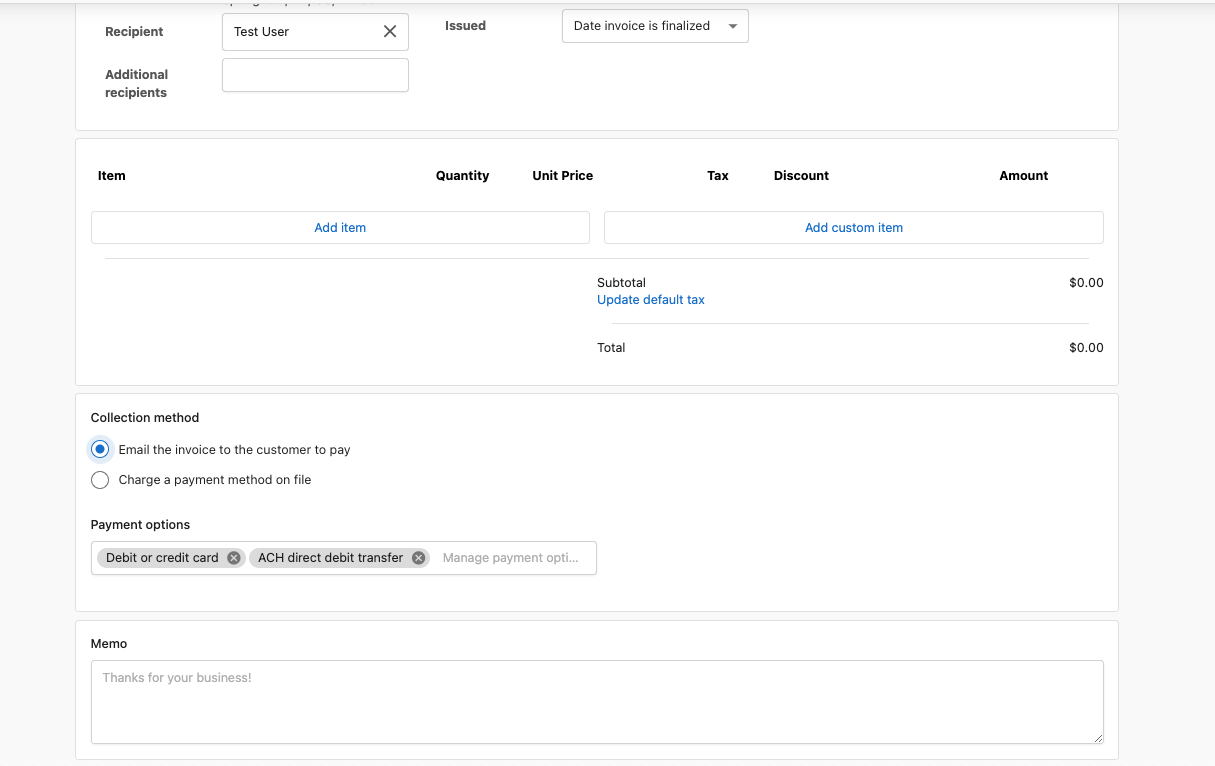
Create an invoice (one-time or recurring invoice) for a client account and select
Email the invoice to the customer to payunder collection method. Under the payment options, selectDebit or Credit Cardsand/orACH direct debit transfer. You can select one or both options depending on how you would like your client to pay.- You can also automatically charge a payment method on file. Select
Charge a payment method on fileand select the desired payment method.
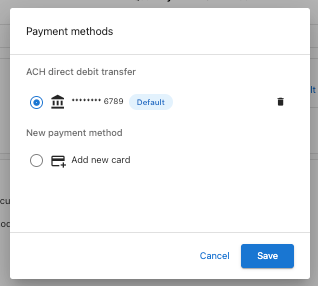
- To get the client's payment method on file, first send them an invoice and ask them to pay and agree to an authorization mandate granting you permission for subsequent automatic charges.
- You can also automatically charge a payment method on file. Select
-
Send the invoice to your client to pay.
-
Your client sees the payment options you selected. With the ACH option, they see
US Bank Account.- Your client is prompted to log in and accept the mandate agreement, which authorizes you to auto-charge future invoices.
How do I request ACH payments in subscription billing?
-
Select the client account and go to
Subscriptions→Billing Settingsto enable subscription billing if you haven't already done so. -
Select the collection method
Email the invoice to the customer to payand under payment options, selectDebit or Credit Cardsand/orACH direct debit transfer. You can select one or both options depending on how you would like your client to pay.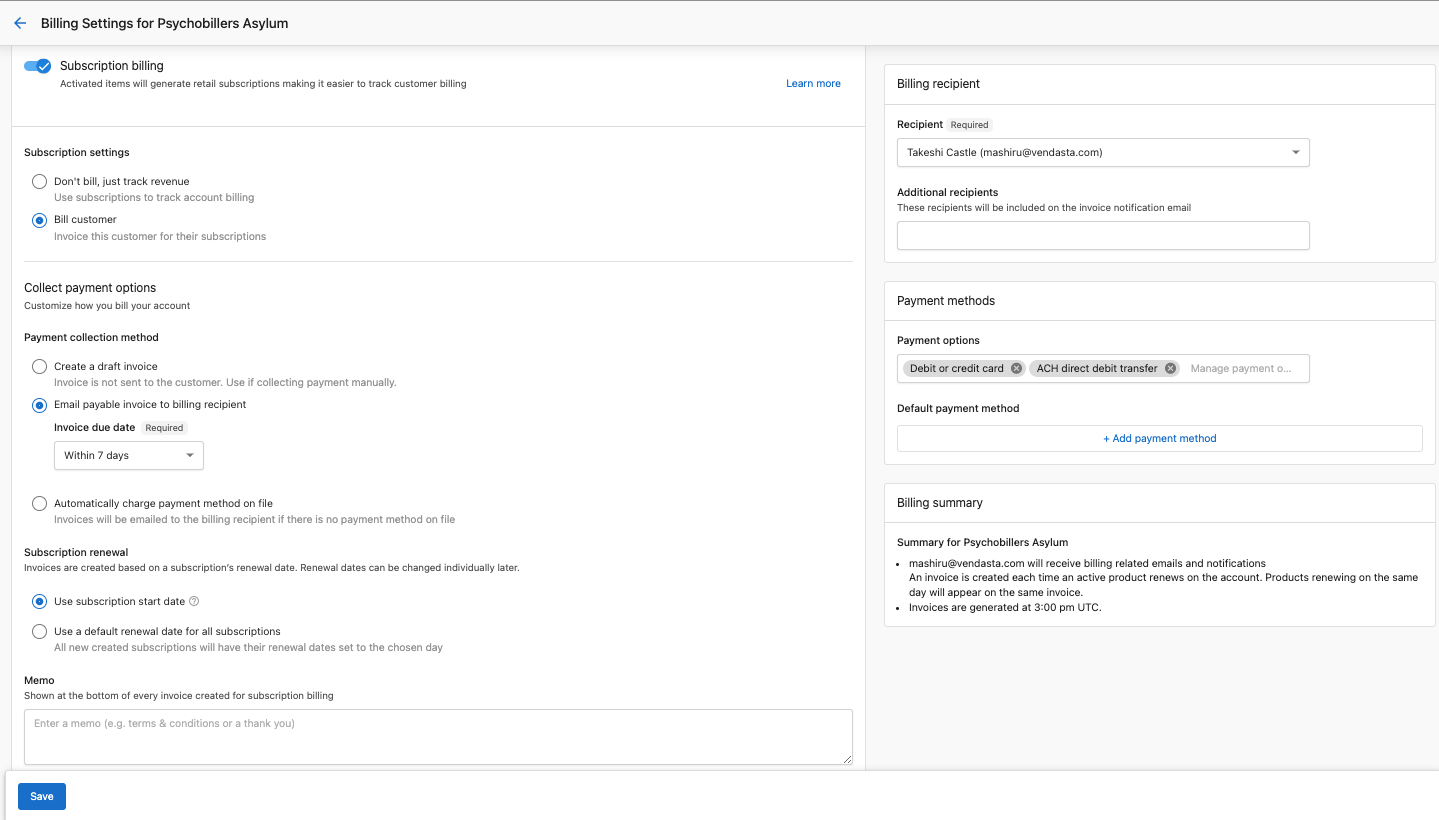
- You can also automatically charge a payment method on file. Under payment options, select
Automatically charge payment method on fileand choose the default payment method.
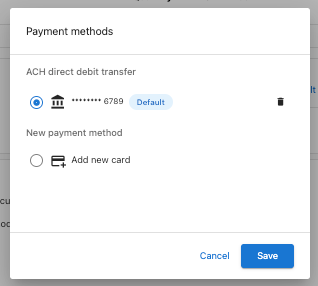
- You can also automatically charge a payment method on file. Under payment options, select
-
Save the changes.
-
All invoices generated from subscription billing will be set to the configured payment options by default.
-
The configured payment options will also be the default for new manual invoices you create on the account.
How do I collect payment on an order before products are activated?
You can request payment from clients using ACH or Pre-Authorized Debits (PADs) before products are activated and wholesale charges are incurred. Clients will enter their payment information just as they would with an invoice. Products are automatically activated once the payment is successfully processed.
To set up this process:
-
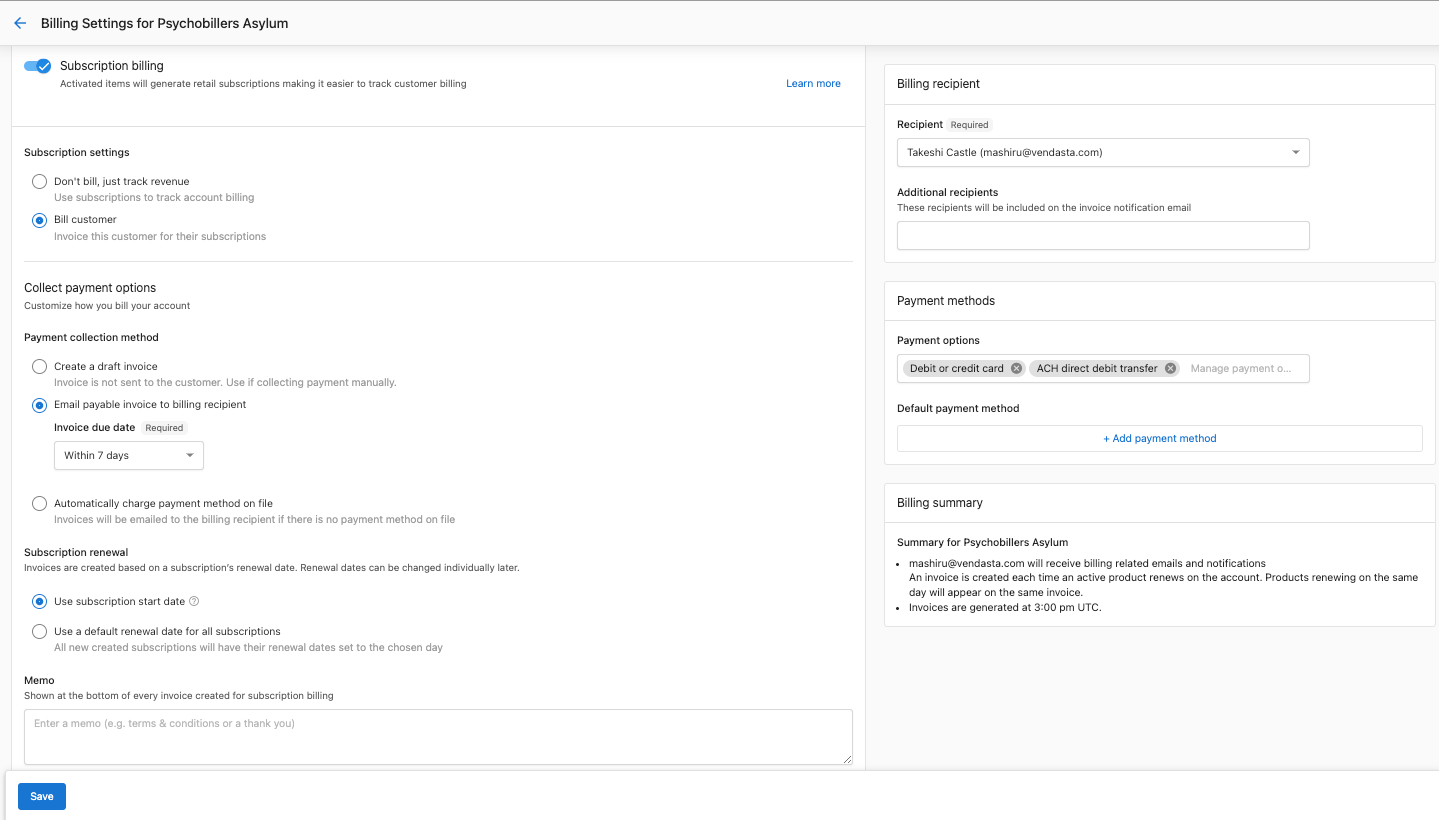
Enable Subscription Billing:
- Navigate to the client account.
- Go to
Subscriptions→Billing settingsand enable subscription billing if it isn't already active. Refer to Subscription Management for detailed subscription billing setup if needed.
-
Configure Payment Options:
- Select
Email the invoice to the customer to payunder the collection method. - Choose
Debit or Credit Cardsand/orACH direct debit transferunder payment options, based on your preference for client payments.
- Select
-
Save Changes.
-
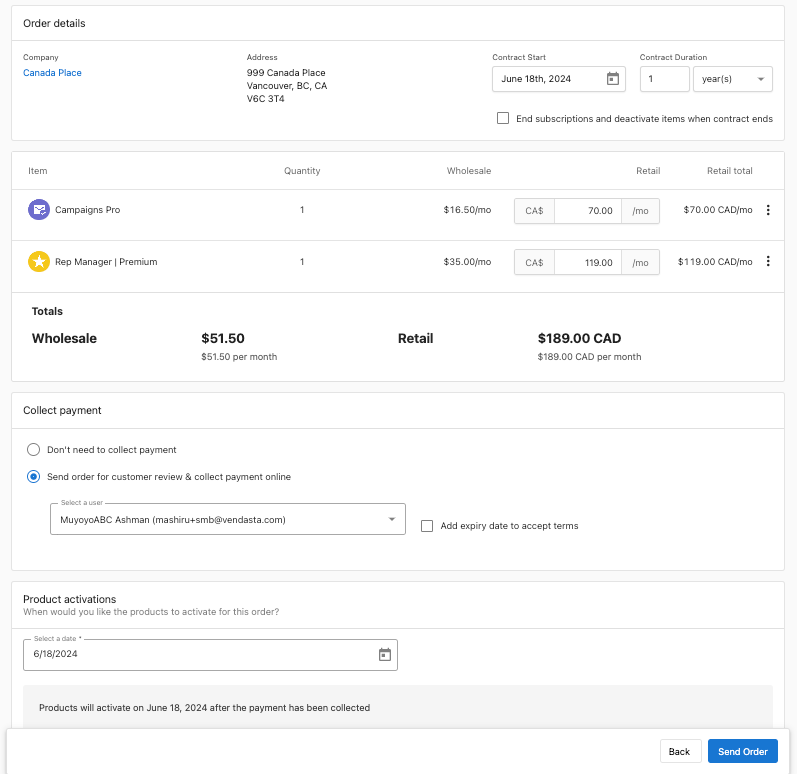
Order and Send Product:
- Go to the Partner Center, order the desired product, and send it to the client for review and payment.
Clients will see the payment options configured in step 2 and can proceed accordingly.
How does the ACH payment workflow work?
ACH payments take up to 5 days to be processed and paid out into your account. Unlike card payments that are instant, ACH payments can be a little hard to track. It is therefore important to know the workflow for this type of payment.
Workflow:
- Send an invoice to your client to make payment using ACH.
- Your client enters their bank account details and agrees to the authorization agreement that gives you a mandate for future payments.
- Payment is made.
- If you choose the auto-charge option, a direct charge is made to the client's bank account.
- When an ACH payment is made, a payment entry is created in pending status since the payment takes some time to be fully processed. Go to
Commerce→Paymentsto see the payment entry. - ACH payments take up to 5 business days. When the funds are received, the payment is marked as successful. If the funds are not received, the payment is marked as failed.
- The invoice status is also updated.
To learn in detail about how the workflow looks in Stripe, check out their ACH guide.
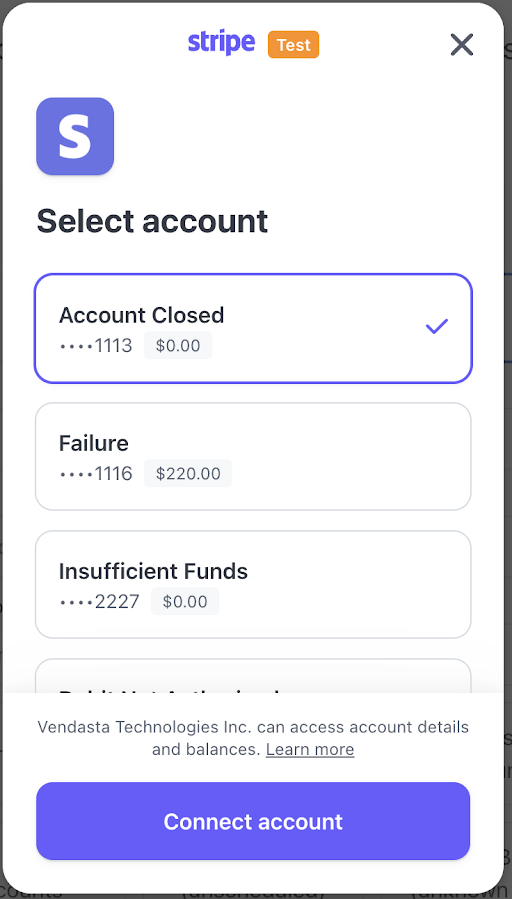
The Vendasta name appears briefly in the client payment flow (see sample below).
How do ACH disputes and refunds work?
It should be noted that Vendasta has no contractual relationship with your clients and is not liable for any disputed transactions.
Disputes
To minimize disputes and chargebacks, always obtain explicit consent from your clients before debiting their cards or bank accounts.
- Dispute Window:
- Clients can dispute a payment through their bank up to 60 calendar days after a debit from a personal account, or up to 2 business days for a business account.
- Handling Disputes:
- ACH Direct Debit disputes are final, with no process for appeal. If a dispute is successful, you must contact the customer directly to resolve the issue.
- A successful dispute invalidates the associated mandate, preventing its reuse. To re-attempt a charge, resolve the dispute and obtain a new mandate authorization.
- If a subsequent payment is disputed, Stripe blocks the bank account from further use.
Refer to Stripe support article here if needed.
Refunds
- Refund Window:
- Refunds for ACH Direct Debit payments can be submitted up to 180 days from the original payment date.
- Refunds take at least 3 business days to process.
- Early Refunds:
- If you request a refund for a payment that hasn't completed yet (within a few hours of creating the Payment Intent), Stripe cancels the original payment by not submitting the charge to the bank, effectively voiding the transaction rather than processing a refund.
- Refer to Issue Credit Notes to Clients for how to issue a refund.
Frequently asked questions
Can a client pay for an order by ACH?
Yes. In the client account, go to Subscriptions → Billing settings, enable subscription billing, select Email the invoice to the customer to pay, and choose ACH direct debit transfer under payment options. Your client sees only the payment options you selected, so if ACH isn't selected they see card options only.
Are products activated after the client pays?
Yes. When you collect payment on an order, products are automatically activated once the payment is successfully processed.
What are the ACH processing fees?
ACH transactions cost 1% of the invoice amount plus a $1 instant verification fee. A failed ACH direct debit payment costs $4.00, and a disputed one costs $15.00.
How long does an ACH payment take?
ACH payments can take up to 5 working days. The payment shows as pending in Billing → Payments until the funds are received, then it's marked successful or failed and the invoice status updates.
How do I refund an ACH payment?
You can refund an ACH direct debit payment up to 180 days from the original payment date, and refunds take at least 3 business days to process. See Issue Credit Notes to Clients for how to issue a refund.
Can I use ACH payments outside the US?
No. ACH payments require Vendasta Payments to be set up and your agency to be based in the US, serving clients also located in the US.