Run your first Snapshot Report
Outcomes
The report that starts the sale
One report starts the sale. The Snapshot Report grades a business's online presence into a single page, so your first conversation with a prospect opens on evidence instead of opinion. It is the report for businesses you have not signed yet; once a business becomes a client, the Executive Report takes over as the ongoing proof.
This path follows one prospect through the whole motion: Northside Dental, a clinic whose owner is sure the practice is doing fine and has never seen what patients find online. Choose your own Northside Dental, a local business you know, and by the end of this step it will have an account in your Partner Center and a Snapshot Report on the way. You will work in your own Partner Center throughout.
Choose your prospect and create the account
You are here: Partner Center. Everything in this step happens in your workspace.
The account is the prospect's home in your workspace, and creating it also creates the linked CRM company, so your sales activity and the service record stay connected from the first touch. Two details carry the report: the primary category, because every grade is benchmarked against the business's industry, and the salesperson, because a report is sent from a person, and that person is you. When the category populates itself from the search, that is a small piece of intelligence in its own right: a business the directories can already categorize is usually one with a Google presence to work with, which is worth knowing before you open the conversation.
Labcreate your prospect's account
Go to Partner Center → Accounts → Manage Accounts.
When the search comes back with nothing and you have to type every field yourself, that is not the annoying version of this task. That is the finding. A business the directories cannot describe has no virtual doorway at all: nothing out there for a search engine or an AI tool to read, and nothing for a customer to find. Those accounts take the longest to create and need you more than any prospect who was already listed everywhere.
For every field and option along the way, this guide covers creating accounts. And when you want the platform to surface prospects for you instead, Find Leads searches local businesses from the CRM and creates company records in bulk.
Run the report
Labrun the Snapshot Report
Stay in Manage Accounts.
The report gathers data over its first 24 hours and keeps enriching for seven days, so the seven-day mark is the fullest picture of the business. That timing is a selling rhythm: run the report when you pick the prospect, and present it when it has the most to say.
Hear the moment it is ready
Labturn on the Snapshot Ready notification
Go to Partner Center → Administration → Client Notifications.
What the grades measure
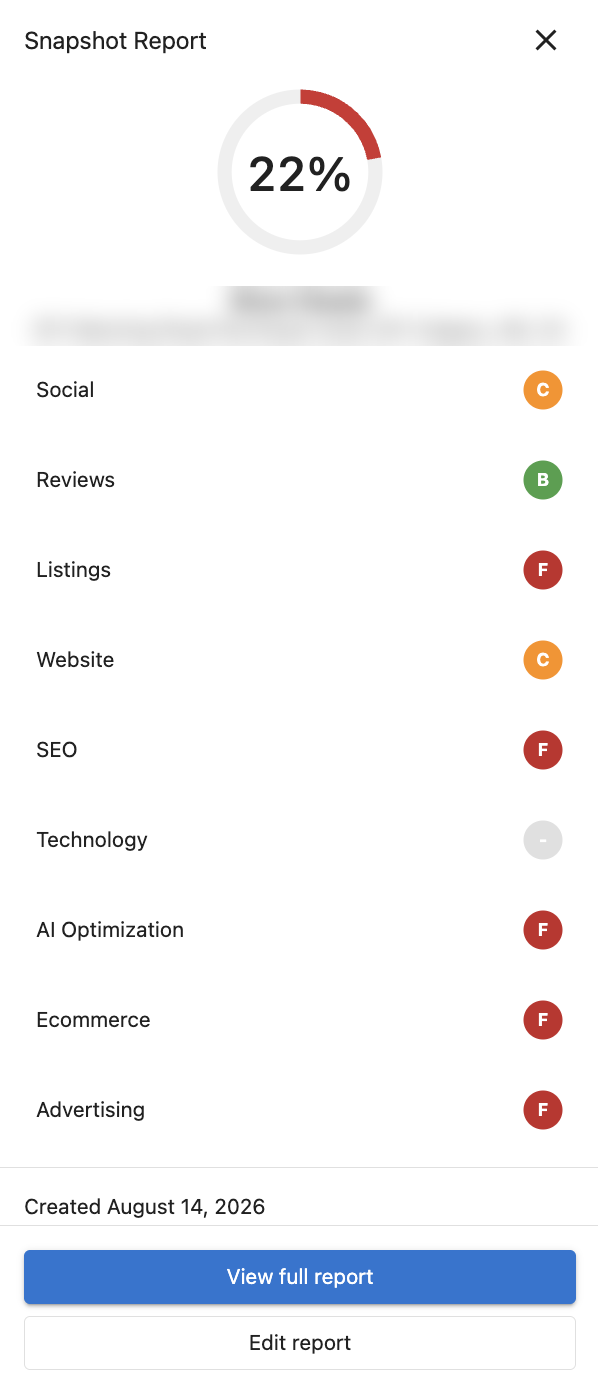
The report grades eight parts of the business's online presence, each with a letter grade from A to F, rolled into an overall Digital Score:
- Business listings: how accurately the business appears across online directories
- Reviews: volume, ratings, frequency, and where they land
- Social media: presence, followers, and posting rhythm
- Website performance: speed and mobile experience, measured with Google's Core Web Vitals
- SEO: how visible the business is in organic search
- Advertising: online advertising presence against its industry's top keywords
- Ecommerce: whether the business can sell, schedule, and take payment online
- AI optimization: whether the business shows up when customers ask AI tools instead of search engines
Every grade is a comparison against the business's own industry, which is what the primary category feeds. Northside Dental came back a B in reviews and a D in listings: patients love the clinic, and the directories cannot find it. A gap like that is where a sale begins.
While your report generates, open the sample report in the Snapshot Report guide and skim the scorecard the way an owner would. Notice which grade you would feel first.
What you now have
- A real prospect with an account in your Partner Center, and its linked CRM company created for you
- A Snapshot Report generating, at its fullest at the seven-day mark
- The Snapshot Ready notification on, so you present on your schedule
- Yourself assigned as the salesperson, which is what lets the report be emailed to the owner when you are ready
Northside Dental has its grades. Yours are on the way.
Knowledge Check
Three quick questions on the two reports, the primary category, and the report's timing.